Sign In

    Enjoy FOSSwire's content? Have it delivered! Subscribe

    Fix your False Tags with Ex Falso

    Don't you hate it when you are scrolling through an album in your playlist, only to find out that one of the tracks is out of order? Or that it left out some essential things, like Artist?

    Fix those problems with Ex Falso, a simple, fast, and powerful tag editor for OGG, MP3, FLAC, and others.
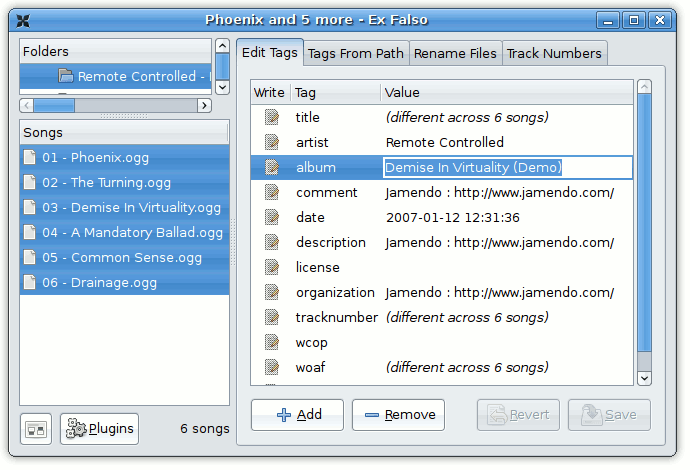
    exfalso.png

    Simply browse to a directory where your music is stored, and select the songs you want to modify. It even includes a way to set your tags based on the filename, or the other way around: rename your files based on the tags.

    The Track Numbers browser is also handy; with it you can order your songs and have the appropriate tracks set with one click.

    Ex Falso is bundled with Quod Libet, but you may download it as a separate package.


    Avatar for jacob Jacob Peddicord - http://jacob.peddicord.net/

    Jacob is a web developer, student, and programmer from Ohio. He is a staff member at the Ubuntu Forums and is most likely a fanboy of the distribution. He loves to write in code and words, play video games, and rant about topics most would have abandoned long ago. Jacob uses GNOME and is never seen running stable software, much to the demise of his laptop.


    Tagged in

    • FSDaily

    Home » Articles »

    Discussion: Fix your False Tags with Ex Falso

    1. # Posted on 31 October 2007 at 09:39 AM

      [...] Consistent metadata with Ex Falso Filed under: Linux — 0ddn1x @ 2007-10-31 16:39:26 +0000 http://fosswire.com/2007/10/21/fix-your-false-tags-with-ex-falso/ [...]


    Did you like this article? Want to help write the content that makes FOSSwire great? Submit your own article and get it reviewed by other members.

    Home » Articles » Fix your False Tags with Ex Falso