Sign In

    Enjoy FOSSwire's content? Have it delivered! Subscribe

    Installing .package files

    Installing software on Linux isn't always an easy process, as you might know. In this tutorial, I'm going to walk you through installing .package files.

    These files are known as AutoPackage files (an idea spearheaded by the AutoPackage project).

    Installing them is frightfully easy. Once you've downloaded or otherwise acquired a .package, first of all right-click it and choose Properties. Go to the Permissions tab and tick 'Is executable' (or tick all three boxes under the Execute heading). Now click OK.

    Double-click the file and follow the instructions.
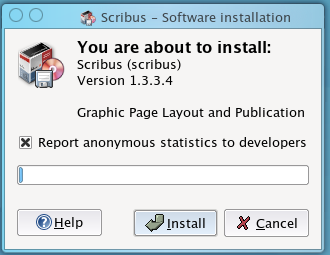
    AutoPackage Install

    If you're asked for the 'system password', that will be the root password you made during install, or if you're running Ubuntu or otherwise didn't set up a root user, it's your password.

    It really is that easy - follow the instructions!


    Avatar for peter Peter Upfold - http://peter.upfold.org.uk/

    Peter Upfold is a technology enthusiast from the UK. Peter’s interest in Linux stems back to 2003, when curiosity got the better of him and he began using SUSE 9.0. Now he runs Ubuntu on his white MacBook, runs a CentOS-based web server from home for his personal website and dabbles in all sorts of technology things.


    Tagged in

    • FSDaily

    Home » Articles »

    Discussion: Installing .package files

    Did you like this article? Want to help write the content that makes FOSSwire great? Submit your own article and get it reviewed by other members.

    Home » Articles » Installing .package files